





Sales reps spend only 30% of their time selling, losing over 2 hours daily to repetitive tasks and app-switching. Poor tool integration and scattered workflows cost businesses 10–15% in productivity. Salesforce and Microsoft Teams integrations aim to fix this by automating tasks, standardizing workspaces, and reducing inefficiencies.
Key Takeaways:
- Native tools like Salesforce Flow and Teams templates simplify collaboration but require manual setup for larger tasks.
- Generic connectors (e.g., Zapier, Power Automate) enable basic automation but lack workspace consistency.
- nFlow automates workspace creation, ensuring structured and efficient workflows for sales teams.
Which is best?
- Small teams: Native tools.
- Startups: Generic connectors.
- Enterprises: nFlow for scalability and standardization.
Stats to know:
- Automation saves 44,000 hours and $6.9M (e.g., Holmes Murphy).
- Teams using automation see 35% faster deal closures and are 83% more likely to grow revenue.
Efficient sales automation tools are essential for reducing admin tasks and increasing sales productivity.
1. Native Salesforce and Microsoft Teams Capabilities
Native tools in Salesforce and Microsoft Teams offer useful automation features, but they often leave gaps that more advanced platforms can fill.
No-Code Setup
Microsoft Teams simplifies automation with prebuilt business templates and an AI-powered Workflow Builder that lets you create custom workflows using plain language inputs. These no-code tools provide a solid foundation for streamlining and integrating sales processes.
For Salesforce users, the Sales app for Outlook offers a seamless way to collaborate. With this tool, you can create Teams channels directly linked to CRM accounts from your inbox. Even better, the system automatically selects team members based on the Salesforce account owner and account team. This eliminates the hassle of manually tracking down the right contacts or copying information between platforms.
Salesforce-Triggered Automation
Salesforce’s built-in automation handles tasks like lead scoring, contact management, and generating sales quotes. It can also send real-time alerts when certain events occur – like a meeting request, a mention of a competitor, or the arrival of a high-priority email. These alerts are delivered straight into Teams, keeping everyone in the loop without constant CRM monitoring.
A great example of this in action is RBC Wealth Management. They revamped how their financial advisors prepared for client meetings by integrating their CRM with other systems and setting up automated workflows. Previously, advisors spent three to four hours gathering data from 26 different systems. By automating this process, they cut down data collection time and created a unified view of customer information, complete with alerts for overdue priority calls.
Workspace Standardization
With the Account Team template in Teams, sales workspaces are standardized to include predefined channels and pinned apps. This ensures consistency across teams, so new members can quickly locate files, discussions, and CRM data without confusion.
However, setup is somewhat limited. While the Sales app for Outlook can recommend team members based on CRM data, you’ll still need to manually add customers and key colleagues. This highlights the need for more comprehensive automation.
App-Switching Reduction
Microsoft Teams allows you to pin Salesforce as a tab, making it easy to search records, share files, and receive real-time alerts – all within a single workspace. This integration reduces the constant back-and-forth between apps.
That said, sales reps still spend about 70% of their week on non-selling tasks like manual data entry and lead prioritization. While native tools help streamline some processes, they don’t completely remove the administrative tasks that slow sales teams down.
2. Generic Salesforce–Teams Connectors and Point Solutions
Generic connectors such as Zapier, Power Automate, and Appy Pie Automate serve as bridges between Salesforce and Teams, using visual builders to simplify the process. These tools enable non-technical users to create workflows in an average of six minutes, making automation more accessible without needing developer expertise. In 2023, 87% of Forbes Cloud 100 companies used Zapier for no-code automation, and 93% of users reported that these platforms improved their job performance. However, while these tools make automation easy, they lack the depth and workspace standardization offered by more specialized platforms.
No-Code Setup
The majority of these connectors rely on visual builders that use straightforward "if this, then that" logic. For example, you might set a Salesforce trigger like "New Lead" or "Opportunity Stage Change" and pair it with a Teams action, such as posting a message in a channel or starting a chat. Setting this up generally involves authenticating both apps through OAuth2, defining trigger conditions, and mapping fields. Connecting Salesforce often requires manual sign-in.
Salesforce-Triggered Automation
These tools enable Teams notifications based on specific Salesforce events. By applying conditional logic, users can filter for high-priority updates, such as deals exceeding $20,000 or activities involving VIP clients. While this helps reduce unnecessary alerts, the automation remains basic compared to the more advanced playbook functionalities that dedicated platforms provide.
Workspace Standardization
Although generic connectors can automate the creation of Teams channels based on Salesforce record criteria, they fall short when it comes to fully standardizing workspaces. Features like consistent tabs, folder structures, or pre-installed apps across new workspaces are not fully supported. Tools like MuleSoft Composer and Power Automate offer pre-built templates with predefined field mappings, but they focus more on workflow consistency than on comprehensive workspace configuration.
App-Switching Reduction
By integrating Salesforce data directly into Teams, these connectors help users stay within their primary workspace. Teams users with synced Salesforce data report closing deals 23% faster. Features like mentioning, previewing, and editing Salesforce records within Teams chats or pinned tabs reduce the need to toggle between multiple browser tabs. This improves real-time data accuracy, CRM updates, and forecasting efficiency.
While these point solutions simplify specific tasks, they leave gaps in functionality that advanced platforms like nFlow are designed to address.
3. nFlow as a Salesforce–Teams Workspace Automation Platform
nFlow takes Salesforce playbooks and integrates them directly into Microsoft Teams, going beyond the basic syncing capabilities of native tools and generic connectors. By automating the creation of Teams workspaces based on Salesforce events, nFlow removes the hassle of manual setup and ensures a smoother sales execution process.
No-Code Setup
With nFlow, setting up automation is simple, thanks to its dual Setup Assistants. These tools guide Salesforce and Teams administrators through a one-time, no-code configuration process. Using Salesforce Flow – whether Record-Triggered or Screen Flows – admins can easily define automation rules with just a few clicks. Authentication is managed securely through Salesforce OAuth and Azure AD SSO, providing seamless access across both platforms. This setup bridges the gap between CRM and collaboration tools right from the start, enabling smooth and secure integration.
Salesforce-Triggered Automation
nFlow takes automation to the next level by creating or linking Teams workspaces whenever specific Salesforce criteria are met. For example, when an opportunity changes stage, hits a certain amount threshold, or is flagged as high priority, nFlow can automatically generate the appropriate team and channels. Administrators use flow-driven logic to ensure workspace creation aligns with the same centralized business rules already in place within Salesforce. Additionally, nFlow sends standardized notifications to Teams channels whenever key fields are updated, keeping everyone on the same page without manual intervention.
Workspace Standardization
Every workspace created by nFlow comes pre-loaded with a consistent playbook structure, including channels, folders, file templates, and task checklists. To maintain uniformity, the platform provides three pre-defined message formats that incorporate record details and action links. Teams administrators retain control over notifications, deciding which teams and channels can receive updates. This governance prevents communication silos and ensures that every deal room, account space, or case room follows a standardized setup – something generic connectors often fail to deliver.
App-Switching Reduction
nFlow minimizes the need to jump between apps by embedding Salesforce records directly into Teams as tabs. Notifications include action links that take users back to Salesforce records, creating a seamless connection between the two platforms. Teams channels can also be managed directly via Salesforce Flow, cutting down on administrative app-switching. This setup keeps Salesforce as the system of record while positioning Teams as the central hub for collaboration, streamlining workflows and improving overall efficiency.
sbb-itb-95f1422
Pros and Cons
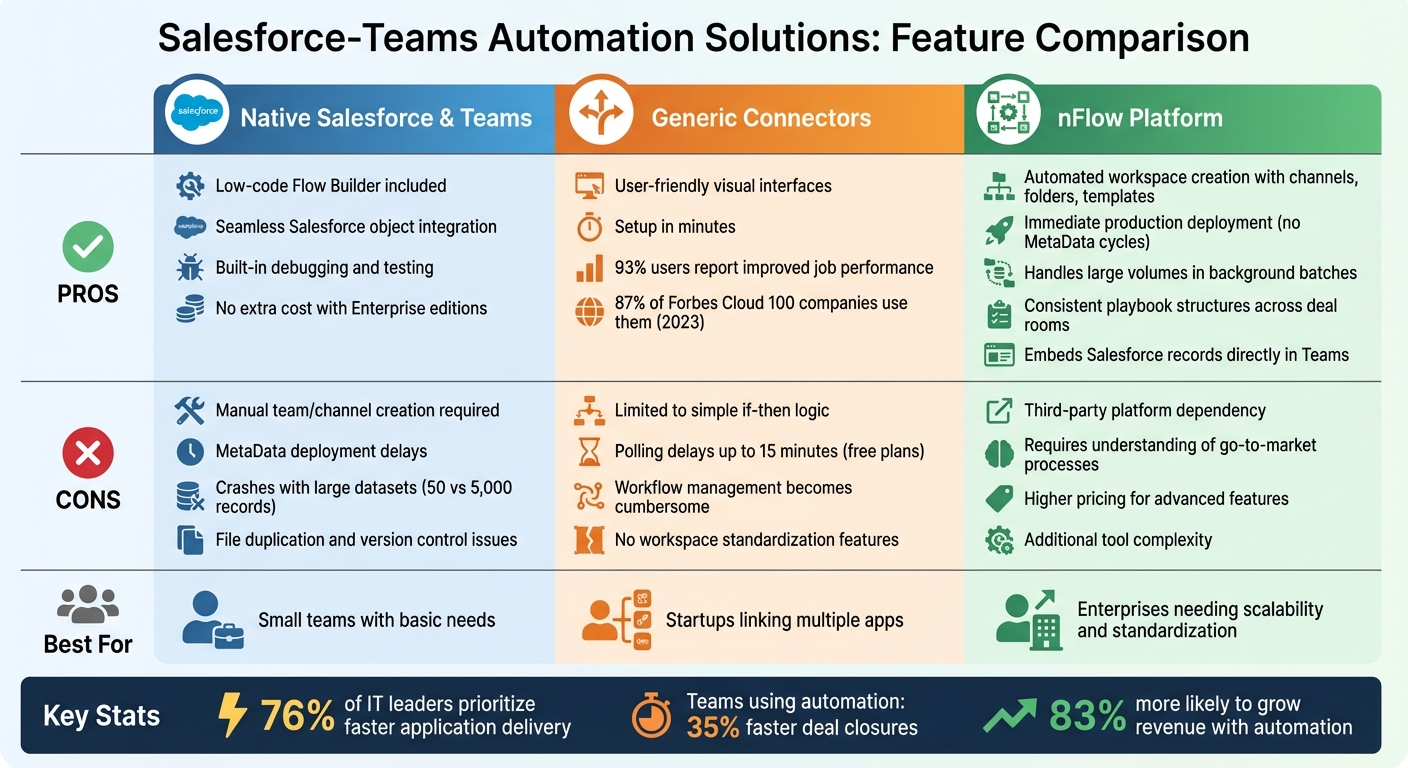
Salesforce-Teams Automation: Comparing Native Tools, Generic Connectors, and nFlow
Every automation approach comes with its own set of benefits and limitations. Native tools provide strong integration but need manual effort for larger tasks, generic connectors offer ease of use but lack depth, and platforms like nFlow deliver advanced automation at the cost of adding another tool to your stack.
Here’s a quick comparison of the key strengths and weaknesses of each option:
| Approach | Pros | Cons |
|---|---|---|
| Native Salesforce & Teams | Offers low-code tools like Flow Builder; integrates seamlessly with Salesforce objects; includes built-in debugging and testing tools; bundled with Enterprise editions at no extra cost. | Requires manual creation of teams and channels despite integration; MetaData deployment adds delays when moving changes from Sandbox to Production; struggles with large datasets – flows that handle 50 records may crash with 5,000; file duplication issues between platforms lead to version control headaches. |
| Generic Connectors | User-friendly visual interfaces allow basic automation setup in minutes; 93% of users report improved job performance; widely adopted by 87% of Forbes Cloud 100 companies in 2023. | Limited to simple "if-then" logic, lacking support for complex business rules; polling-based triggers can delay actions by up to 15 minutes on free plans; managing workflows becomes cumbersome as they grow; lacks features for workspace standardization. |
| nFlow (Workspace Automation) | Automatically creates standardized workspaces with pre-loaded channels, folders, templates, and checklists from Salesforce events; avoids MetaData cycles, enabling immediate production deployment; processes large volumes in background batches to bypass CPU limits; ensures consistent playbook structures across deal rooms and account spaces; reduces app-switching by embedding Salesforce records directly in Teams. | Requires adopting a third-party platform; setup demands a solid understanding of go-to-market processes; pricing reflects its advanced features; adds complexity by introducing another tool to manage. |
These comparisons show why many teams eventually move beyond native tools and generic connectors to platforms like nFlow when they need more robust automation.
Ultimately, the best choice depends on your team’s size and needs. For example, 76% of IT leaders prioritize faster application delivery, which explains why larger teams often outgrow simpler solutions. Native tools are great for small teams with basic requirements, generic connectors work well for startups linking multiple apps, and specialized platforms shine in enterprise environments where efficiency and standardization are crucial.
Conclusion
Based on the analysis above, selecting the right automation platform is a crucial step in aligning your sales process with today’s workflow demands. The right tool depends on your team’s size, current needs, and long-term goals. For smaller teams needing basic record visibility and manageable manual processes, a native Salesforce–Teams integration might suffice. Generic connectors can help sync data across multiple applications but often fall short when it comes to eliminating manual tasks. However, for mid-to-large U.S. sales teams that rely on structured playbook execution – like MEDDIC or SPICED frameworks – and need to reduce app-switching chaos, a workspace automation platform like nFlow provides the organization and consistency required to achieve results.
Statistics underline the importance of automation. Sales teams using AI and automation tools are 83% more likely to achieve revenue growth. Additionally, companies that leverage real-time CRM insights report 35% faster deal closing rates. Despite these advantages, 67% of sales reps still expect to miss their quotas, often due to tech stacks that fail to minimize administrative burdens.
Manual processes and inconsistent playbook execution remain key obstacles to performance. As Jonathan M. Kvarfordt from Momentum highlights:
"In 2025, sales teams are expected to move faster, operate smarter, and deliver results without friction."
The shift from simply logging data to orchestrating seamless workflows is what sets successful teams apart. While native tools and generic connectors can serve as a starting point, when your sales process involves managing dozens of deal rooms and hundreds of opportunities, you need an automation platform capable of integrating channels, templates, tasks, and checklists directly into your workspace.
To ensure the platform meets your needs, request demos and involve your sales team in the evaluation process. The right tool should simplify workflows, reduce friction, and empower your team to work faster and more confidently – without adding unnecessary complexity or forcing them to hunt for the latest proposal draft across multiple screens.
FAQs
How does nFlow ensure consistent and automated workspace setup compared to built-in tools?
nFlow takes the hassle out of setting up Teams workspaces by automating the entire process based on Salesforce records. Whether it’s a deal, account, or case, nFlow ensures that every workspace is built with the same structure and standards. These workspaces come ready-to-go with predefined channels, folders, file templates, task lists, and even a pinned Salesforce tab – all automatically created as soon as a record matches your preset rules. This means no more manual setup and complete consistency across your organization.
On the other hand, native Salesforce-Teams connectors have limitations. They let users bring Salesforce data into Teams, like pinning records or editing them inline, but still require manual workspace setup or rely on basic templates. nFlow goes a step further by fully automating the process, delivering workspaces that are not only consistent but also aligned with your Microsoft 365 governance policies, ensuring security and proper lifecycle management.
How does nFlow benefit large enterprises using Salesforce and Microsoft Teams?
nFlow simplifies teamwork for large enterprises by automatically setting up and organizing Teams workspaces based on Salesforce records. Instead of spending time on manual setup or switching between apps, nFlow ensures each workspace is ready to go with the right structure, files, and tasks already in place, following your playbooks.
This means sales and service teams can concentrate on getting things done rather than dealing with administrative hassles. With smart notifications and smooth integration between Salesforce and Teams, everyone stays in the loop. Plus, governance and lifecycle policies are built to align with your Microsoft 365 setup, ensuring everything runs smoothly and stays compliant.
What should sales teams look for when choosing an automation tool?
Sales teams need tools that not only align with their objectives but also streamline their day-to-day workflows. For instance, if your team needs to create Microsoft Teams workspaces directly from Salesforce records – like opportunities, accounts, or cases – the ideal tool should automate the entire process. This includes setting up Teams structures like channels, tabs, and tasks without the hassle of manual steps or switching between apps.
nFlow stands out by automating the creation or linking of Teams workspaces based on Salesforce events. It goes a step further by pre-loading these workspaces with folders, templates, and tasks from your sales playbook, while also pinning relevant Salesforce records as tabs. This means no more tedious manual setup – each workspace is ready to go and perfectly aligned with your sales processes. Plus, nFlow adheres to your Microsoft 365 governance and lifecycle policies, ensuring scalability and compliance. Unlike other tools that might demand extra configuration or scripting, nFlow delivers a smooth, automated experience tailored specifically for sales and service teams.
Leave a Reply