





Sales teams often lose time and deals due to fragmented tools and scattered communication. Integrating Salesforce with Microsoft Teams channels solves this by creating centralized, deal-specific workspaces. These "deal rooms" consolidate CRM data, conversations, files, and updates in one place, cutting inefficiencies and improving collaboration.
Key benefits include:
- Centralized deal workspaces: Automatically created channels for each opportunity, pre-loaded with Salesforce data and playbook templates.
- Real-time updates: Notifications for deal progress, lead assignments, and escalations directly in Teams.
- Automation with nFlow: Simplifies channel setup, task assignment, and file organization, saving time and ensuring consistency.
This system eliminates manual processes, reduces silos, and helps sales teams focus on closing deals instead of managing tools. By aligning workflows and communication, businesses can boost productivity and streamline their sales process.
Why Sales Communication Breaks Down
Sales teams often face a frustrating challenge: fragmented tools. Vital sales information gets scattered across multiple apps, forcing reps to jump between them just to piece together the context they need. This constant switching – between email, CRM systems, chat apps, and shared documents – creates inefficiencies and leads to inconsistent communication patterns. The result? Missed opportunities and wasted time.
How Fragmentation Hurts Sales Performance
The effects of scattered communication are far-reaching, especially when it comes to productivity. Sales reps spend an alarming amount of time toggling between apps and windows, hunting for the information they need. This endless back-and-forth not only disrupts focus but also leads to duplicated efforts and delays in closing deals.
The financial impact is hard to ignore. On average, organizations now rely on 10 different channels to engage customers. This complexity makes it harder to maintain consistent follow-ups and clear messaging throughout the sales process. Without tools that provide real-time updates and foster shared accountability, decision-making slows down, deal cycles stretch longer, and overall business growth takes a hit. Information silos further complicate matters, leaving teams without a unified view of customer interactions or deal progress. This lack of cohesion undermines shared objectives and creates barriers to effective collaboration.
It’s clear that fragmented communication is a major obstacle, and traditional tools often fail to address these challenges.
Why Current Tools Fall Short
Conventional tools, while widely used, often add more friction than they resolve. They fail to bridge the gap between structured CRM data and the unstructured conversations sales teams rely on. For example, manually setting up shared channels, like Teams, forces reps to re-enter data and work with outdated information. These tools also lack real-time visibility into the customer journey and the various stages of a deal, slowing down decisions and causing missed opportunities.
The administrative burden only makes things worse. Sales reps often spend valuable time on manual tasks, such as logging activities and updating records, instead of focusing on customer engagement. Without a shared, integrated view that combines customer data with team insights, cross-functional collaboration becomes a struggle. Basic connectors may move data between systems, but they don’t create the rich, context-driven workspaces sales teams need to collaborate effectively.
In short, traditional tools aren’t equipped to meet the demands of modern sales teams, leaving them to navigate a fragmented and inefficient system.
How Salesforce-Driven Teams Channels Fix Communication Problems
Imagine having all your Salesforce records integrated directly into Microsoft Teams channels. This setup eliminates the hassle of hopping between apps, creating a centralized hub where collaboration happens effortlessly. By connecting Salesforce records – whether standard or custom objects, complete with activity timelines – into Teams channels, chats, and even meetings, sales teams can work within a unified space. Every deal gets its own dedicated workspace, ensuring all team members access the same information and collaborate without missing a beat.
Now, let’s dive into how these deal-specific spaces improve teamwork.
Creating Deal Rooms with Built-In Context
Salesforce-driven channels simplify teamwork by introducing "deal rooms." These are dedicated workspaces that automatically pull in relevant Salesforce data for each opportunity. Instead of scrambling to find updates or digging through email chains, teams have instant access to everything they need – opportunity details, account history, and the current deal stage – right inside Teams. Everyone involved, from sales reps to legal advisors, can stay on the same page. This shared visibility eliminates repetitive questions like, "Where do we stand on this deal?" and allows teams to focus on moving forward rather than catching up.
But it doesn’t stop at structured workspaces – real-time updates make these deal rooms even more effective.
Getting Real-Time Updates Where Teams Work
The real magic of Salesforce-driven channels is in their ability to deliver real-time updates directly within Teams. Whether it’s a deal moving to the next stage, a lead assignment, or an escalation, the CRM keeps the team instantly informed. This kind of immediacy can make a huge difference. For instance, HubSpot’s integration led to a 25% faster lead response time, a 10% increase in sales meetings booked, and ultimately a 26% boost in revenue. Similarly, ClassPass saw a 30% reduction in customer inquiry response time thanks to real-time updates. Tools like nFlow automate these updates, ensuring consistent communication and structured workflows. Notifications for new leads or critical deal changes allow sales teams to act quickly and decisively.
Christine McHone, Global Slack and Salesforce TMT Industry Leader at Slalom, sums it up perfectly:
"Salesforce channels make the day-to-day easier: They reduce context-switching, provide real-time visibility and bring the right leaders in earlier to find new opportunities."
Setting Up Salesforce-Driven Teams Channels with nFlow
nFlow vs Basic Connectors: Salesforce-Teams Integration Comparison
nFlow takes the hassle out of setting up Teams workspaces by turning your Salesforce sales playbooks into fully functional channels. Whenever a Salesforce record matches your predefined rules, nFlow steps in to create and organize everything automatically. No more scrambling to set up channels, assign tasks, or upload files – just set your rules once, and nFlow takes care of the rest. Let’s break down how it works.
Automatic Channel Creation from Salesforce
nFlow keeps an eye on Salesforce and springs into action when a record matches your trigger. For example, if an opportunity worth over $100,000 moves to the Proposal stage, nFlow’s no-code visual builder creates or links the appropriate Teams channel instantly. You define the triggers – whether it’s a change in a key field or a deal hitting a specific stage – and nFlow ensures every workspace aligns with your naming conventions and structure. This way, your team gets a consistent, organized workspace for every deal.
Pre-Loading Channels with Playbook Content
Once the channel is created, nFlow populates it with everything your team needs. From folders and file templates to tasks and checklists, the workspace is pre-loaded with your sales playbook content. It even pins the relevant Salesforce record as a Teams tab for quick access. Templates like mutual action plans and qualification checklists are added automatically, saving your team the time and effort of setting up each deal manually.
nFlow vs. Basic Connectors
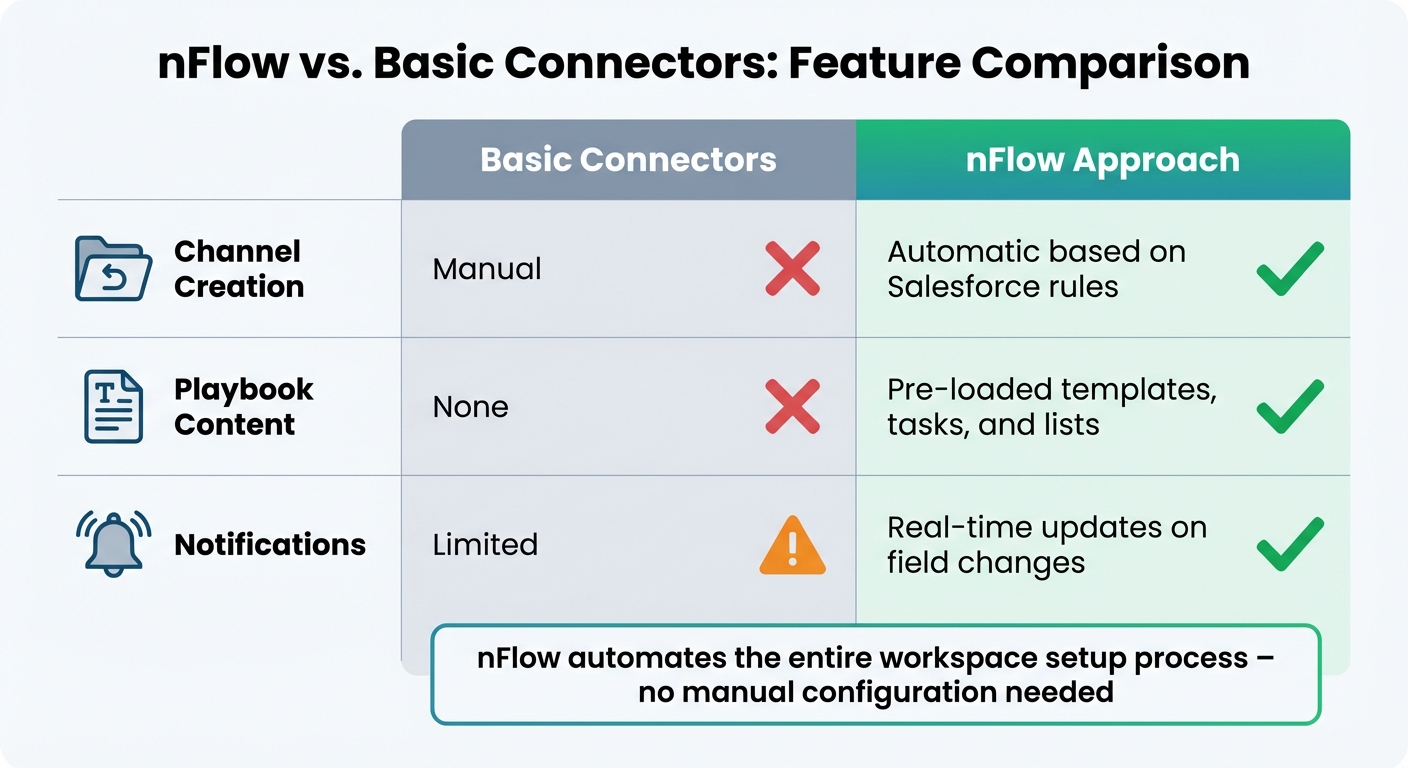
Here’s how nFlow stands out compared to basic connectors that only pull CRM data into Teams:
| Aspect | Other Connectors | nFlow Approach |
|---|---|---|
| Channel Creation | Manual | Automatic based on Salesforce rules |
| Playbook Content | None | Pre-loaded templates, tasks, and lists |
| Notifications | Limited | Real-time updates on field changes |
While basic connectors leave you with the heavy lifting – manually creating channels, uploading templates, and setting up tasks – nFlow automates the entire process. Your team gets a fully prepared workspace right from the start, so they can focus on closing deals instead of wasting time on setup.
sbb-itb-95f1422
Best Practices for Salesforce-Driven Teams Channels
To get the most out of your nFlow-enabled channels, you’ll need a solid structure, clear lifecycle management, and effective team training. Automating workspace creation with nFlow isn’t just about saving time – it’s about ensuring every deal follows a consistent process. But remember, automation only works if your team knows how to use it and keeps things organized over time.
Using Consistent Channel Structures
Start by adopting consistent naming conventions to make channels easier to find and to help new team members onboard faster. As Trailhead puts it: "Consistent names help your team find the right channel, and they help new reps get up to speed quickly". When nFlow creates channels based on Salesforce fields, consider using prefixes like #sales for internal discussions and #ext for external communications. This simple step naturally groups channels in Teams.
Your channel structures should align with key Salesforce objects like Opportunities, Accounts, and Cases, tying directly to record layouts. For example, every deal room should include a standard set of channels. With nFlow’s playbook templates, this structure is automatically enforced, ensuring every workspace starts off consistent. When setting up Salesforce automation, avoid hardcoding IDs or logic. Instead, rely on API Names, Custom Metadata, or Custom Labels to keep things flexible across different environments.
Once your structure is in place, focus on maintaining it with clear lifecycle rules.
Managing Channel Lifecycle and Compliance
Archive channels as soon as a deal closes or a case is resolved. Use nFlow’s automation to trigger this process based on Salesforce field changes. To keep things organized, document governance standards that cover how channels are created, how long they remain active, and when they should be archived.
Make sure your channel lifecycle aligns with Microsoft 365 policies to stay compliant. Set up strong security controls to protect sensitive information, especially for deals involving contracts or customer data. With nFlow, you don’t have to compromise between automation and security – it automatically respects your Microsoft 365 sensitivity labels and privacy settings.
Finally, ensure your team is equipped to make the most of these structured channels.
Training Teams to Use Playbook-Driven Channels
Provide clear and concise training materials for working with nFlow-driven playbooks. Show your team how to find templates, update tasks, and use specific channels for different deal-related activities. Encourage practices like using thumbs-up emojis to acknowledge messages, pinning key documents for easy access, and searching for existing information before asking new questions.
Keep refining your channels by gathering feedback from your team. Celebrate wins and highlight effective practices directly in Teams channels. This approach helps make the use of pre-loaded playbooks and consistent structures an integral part of your team’s workflow.
Conclusion: Centralizing Sales Communication for Better Outcomes
Disjointed sales communication can derail deals. When your team juggles between Salesforce, email, chat tools, and file-sharing platforms, vital details can slip through the cracks, slowing down decisions. By integrating Salesforce with Microsoft Teams channels, you can bring all the key players, data, and workflows into one cohesive space.
The real game-changer here is automation that does more than just sync data. With nFlow, you’re not just linking Salesforce and Teams – you’re turning your sales playbook into an actionable system. For example, when an opportunity is qualified, nFlow automatically sets up the right team and channels, pre-populates them with folders, file templates, tasks, and checklists, and pins the relevant Salesforce record as a tab. This ensures every deal room, account space, or case room is structured consistently, letting your team dive straight into execution without wasting time on setup. This seamless automation paves the way for better, faster collaboration.
This centralized system also enables real-time teamwork and quicker decision-making by keeping all the context in the tools your team already uses. Sales reps don’t need to constantly check Salesforce – smart notifications in Teams ensure they’re updated on key changes like stage progressions, thresholds, or escalations. Routine tasks are handled automatically, letting your team focus on what they do best: building relationships and closing deals.
nFlow eliminates the headaches of manual setups and fragmented tools by offering a complete solution. Unlike basic connectors that only pull in Salesforce data, nFlow creates and manages the entire workspace around that data. With consistent channel structures, automated workflows, and scalable playbook deployment, your sales organization can operate smoothly – no custom development or IT bottlenecks required.
When every deal follows a proven process and every team member has instant access to the information they need, sales performance improves. Centralizing your sales communication and workflows doesn’t just streamline operations – it drives the results your business depends on.
FAQs
How can integrating Salesforce with Microsoft Teams enhance collaboration for sales teams?
Integrating Salesforce with Microsoft Teams boosts teamwork by bringing CRM data directly into Teams. This means sales teams can access and share essential information without constantly toggling between platforms. The result? Smoother communication, better alignment, and faster decision-making.
Tools like nFlow take this integration a step further. nFlow automatically sets up structured Teams workspaces whenever specific Salesforce events occur. These workspaces come pre-loaded with relevant files, tasks, and Salesforce records, ensuring every deal room or account space is well-organized and ready to go. This allows sales teams to concentrate on closing deals rather than juggling multiple tools.
How does nFlow simplify Salesforce-driven Teams collaboration?
nFlow simplifies teamwork by automatically setting up or linking Microsoft Teams channels based on your Salesforce rules. These channels come pre-loaded with everything your team needs to hit the ground running – structured folders, templates, tasks, and checklists pulled straight from your playbook. Plus, important Salesforce records are pinned as tabs for easy access, and real-time smart notifications keep everyone in the loop.
By turning your playbook into actionable steps, nFlow helps sales and service teams work more consistently and efficiently. It cuts down on manual tasks, allowing your team to focus on what really matters.
How do real-time updates in Teams channels enhance sales performance?
Real-time updates in Teams channels keep sales teams on the same page by delivering instant access to vital customer information and updates. This kind of immediacy allows teams to make decisions faster, address issues before they escalate, and collaborate effortlessly across different roles.
When communication flows smoothly and everyone works with the most up-to-date information, sales processes naturally become more efficient. This can lead to shorter sales cycles, faster deal closures, and happier customers. Tools like nFlow can take this a step further by automating and organizing these updates, maintaining consistency and focus in every sales workspace.
Leave a Reply