





Salesforce and Microsoft Teams serve distinct purposes but work best when used together. Salesforce is ideal for managing customer data, tracking sales, and automating workflows. Teams excels in real-time communication, quick collaboration, and document co-authoring.
Here’s the breakdown:
- Salesforce: Centralizes customer data, tracks sales pipelines, automates workflows, and ensures data accuracy.
- Teams: Enables instant messaging, video meetings, and live document collaboration, integrating well with Microsoft 365 tools.
Key Insight: Integration between Salesforce and Teams bridges these strengths. It allows users to access Salesforce data within Teams, reducing app switching and improving efficiency. Tools like nFlow further automate workspace setup, streamlining collaboration.
Quick Comparison:
| Feature | Salesforce | Microsoft Teams |
|---|---|---|
| Primary Function | Customer Relationship Management | Real-Time Communication |
| Data Management | Comprehensive CRM tools | Limited without integration |
| Real-Time Collaboration | Limited | Strong (chat, video, co-authoring) |
| Integration Strength | Integrates with Teams for workflows | Integrates with Salesforce for CRM data |
| Best For | Sales, service, and data tracking | Quick communication and teamwork |
Takeaway: Use Salesforce for structured workflows and Teams for dynamic collaboration. Together, they enhance productivity.
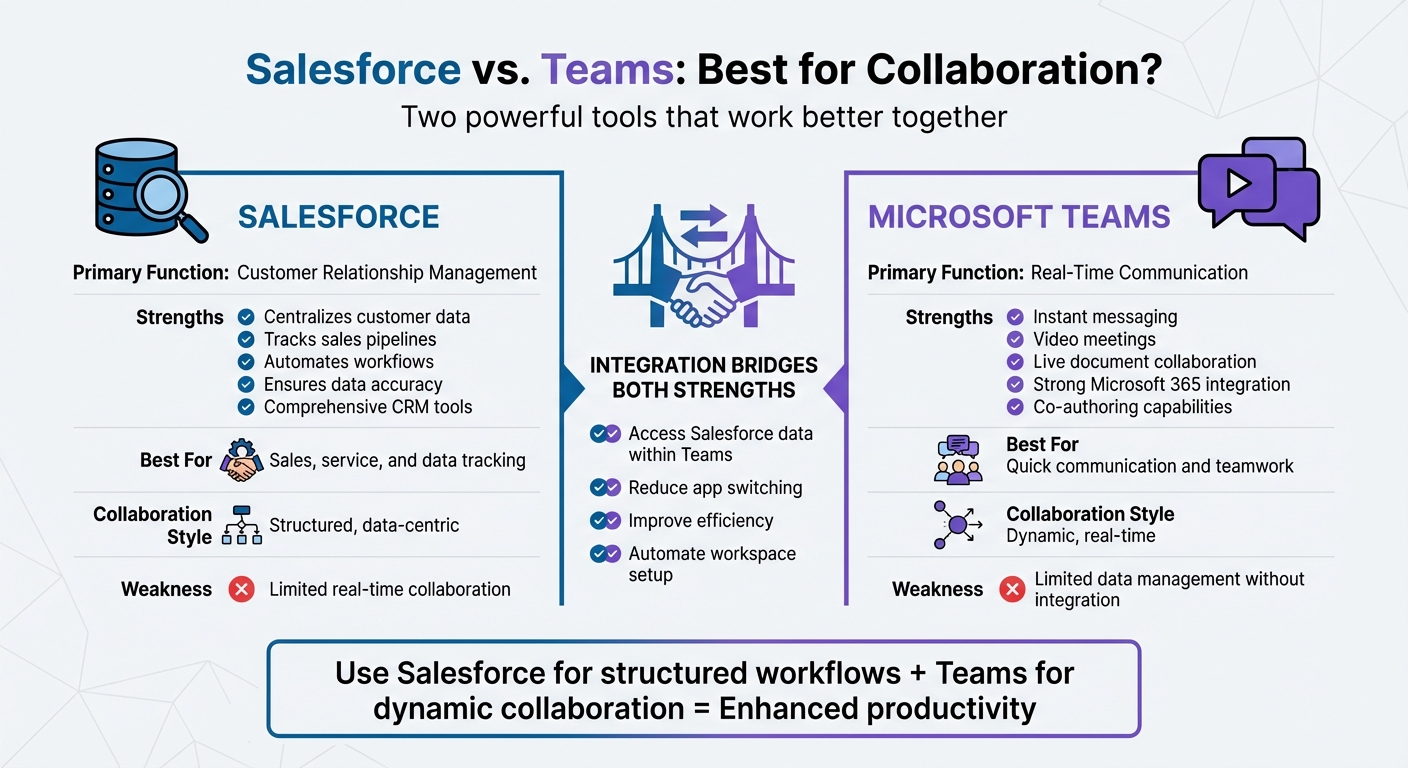
Salesforce vs Microsoft Teams: Feature Comparison for Collaboration
Integrate Microsoft Teams Meetings with Salesforce: Live Demo
Common Collaboration Scenarios in Sales and Service
Sales and service teams rely on a variety of collaboration tools to get their work done. Knowing how each platform fits into the workflow can make a big difference. Here’s how Salesforce and Microsoft Teams work together in some of the most common collaboration scenarios.
Individual Seller Productivity
When it comes to managing the daily grind of sales tasks, Salesforce acts as the central hub. It’s where sellers update pipelines, track leads, manage tasks, and review customer records. Custom dashboards make it easy to check key performance indicators (KPIs) without needing to jump between apps. Plus, automation and custom triggers help simplify approvals and data entry.
On the other hand, Teams is the go-to for real-time communication. Whether it’s getting quick answers from a colleague, pulling in a manager to discuss pricing, or coordinating a customer call, Teams is the space where those conversations happen.
Next, let’s see how this dynamic plays out in deal rooms.
Deal Rooms and Opportunity Collaboration
Deal rooms highlight the powerful synergy between Salesforce and Teams. Salesforce takes care of the data side, handling everything from pipeline status and forecasting to deal stages and structured sales workflows. It’s the system of record, ensuring that all opportunity details and approvals are tracked.
Meanwhile, Teams serves as the collaboration hub where cross-functional teams come together to work on deals. Whether it’s sales, presales, legal, finance, marketing, product development, or customer support, everyone can collaborate in dedicated Teams channels linked to Salesforce opportunities. Salesforce records can be viewed and edited directly within Teams, and even team members without Salesforce licenses can access opportunity details when those records are added as tabs in Teams channels. For deals involving external participants, shared channels make it easy to include customers, with separate options for sharing files and notes.
Account Planning and Customer Reviews
Strategic account planning benefits from combining structured data with dynamic collaboration. Salesforce provides the structure, offering tools like its CRM foundation and native Account Plans feature to organize customer relationships, track engagement history, and outline strategic objectives.
At the same time, Teams facilitates the teamwork needed to execute those plans. Internal teams use Teams channels to prepare for quarterly business reviews (QBRs), discuss account strategies, share insights, and coordinate customer interactions.
Salesforce for Collaboration
Salesforce shines when collaboration revolves around customer data, structured workflows, and well-defined business processes. Acting as a centralized system of record, it consolidates everything from customer interactions to deal stages and service cases, ensuring data integrity across sales, marketing, and service operations. This makes it an ideal solution for teams operating within organized frameworks, where maintaining consistency and accuracy is critical. However, its structured approach contrasts with the dynamic, real-time interaction capabilities offered by conversational tools.
Where Salesforce Excels in Collaboration
Salesforce’s strength lies in facilitating collaboration through structured, data-centric tools. Features like Chatter, Quip, and Salesforce Files enable teams to collaborate directly within CRM records. Meanwhile, automation tools such as Flow, Process Builder, and Workflow Rules streamline complex, multi-step processes, ensuring strategies are followed and data remains clean.
The platform also supports guided selling through playbooks and workflows, helping sales teams stick to consistent processes for managing opportunities, quoting, and approving contracts. Every action is tracked and auditable, which is especially important in scenarios requiring strict governance. Whether it’s enforcing compliance, maintaining audit trails, or managing approval chains, Salesforce provides a structured framework that ensures accountability.
Where Salesforce Falls Short in Collaboration
While Salesforce excels in structure, it struggles with the spontaneity of real-time interactions. Traditionally, it has created silos between CRM-stored customer data and the conversations happening in other tools, leading to fragmented workflows and scattered information. Teams often find themselves toggling between Salesforce and external communication platforms to have quick discussions or get immediate answers.
This separation slows down decision-making and approvals, as requests can get buried in inboxes or require manual follow-ups. For tasks like brainstorming, cross-functional discussions, or live co-authoring, Salesforce isn’t the most natural fit. In these scenarios, tools like Microsoft Teams, designed for real-time collaboration, offer a more seamless experience.
Up next, we’ll look at how Microsoft Teams addresses these real-time collaboration challenges.
Microsoft Teams for Collaboration
Microsoft Teams stands out as a powerful tool for real-time communication, offering dynamic chat features, live document co-authoring, and smooth integration with Microsoft 365 apps like Outlook, SharePoint, OneDrive, Word, Excel, and PowerPoint. While Salesforce shines in data management and organization, Teams focuses on immediacy and fluid communication, making it a compelling alternative to long email threads or endless calendar scheduling. In 2025, Microsoft introduced AI-driven meeting recap and transcription tools, along with AI Copilot in Word, Excel, and Outlook, designed to assist with content creation and task automation.
Here’s a closer look at how Teams’ real-time features drive effective collaboration.
Where Teams Excels in Collaboration
Teams thrives in situations where quick, real-time communication is essential. Its persistent chat feature keeps conversations organized and searchable, while high-quality video meetings and webinars support everything from daily standups to client presentations. A standout feature is the ability to co-author documents within chats, enabling teams to work on proposals or sales decks collaboratively and in real time.
For organizations already using Microsoft 365, adopting Teams is seamless. Users familiar with Outlook and OneDrive can quickly get up to speed, requiring minimal training. Additionally, Teams offers enterprise-level security, compliance tools, and user management, making it especially suitable for large organizations dealing with sensitive customer information.
Despite these advantages, Teams has some limitations when it comes to CRM functionalities.
Where Teams Falls Short in Collaboration
Teams is not designed to function as a CRM platform. It lacks essential features like sales pipelines, forecasting tools, lead management, and case tracking. Without direct CRM integration, Teams cannot display critical insights such as opportunity stages, customer histories, or deal health metrics. While third-party solutions can bridge this gap, they highlight the absence of built-in CRM capabilities.
For those looking to build CRM-like applications using Dataverse for Teams, there are notable challenges. For instance, required fields aren’t enforced, which can result in incomplete data being saved. Power Automate workflows also come with limitations, such as caps on actions per workflow and Power Platform requests – lower-tier licenses allow only 10,000 requests per 24 hours, which could restrict high-volume sales operations. Additionally, embedded apps in Teams must load within 30 seconds, and more complex applications may exceed this limit, causing timeout errors.
sbb-itb-95f1422
Connecting Salesforce and Teams for Real-Time Collaboration
Bringing Salesforce and Microsoft Teams together creates a seamless way to blend structured workflows with real-time communication. With this integration, teams can access Salesforce records, make updates, and collaborate on deals or cases – all without leaving Teams. This setup supports quick decisions during live discussions and allows for asynchronous updates, making it easier for team members to stay aligned across different time zones. Let’s first look at the standard integration options before diving into how nFlow takes automation and efficiency to the next level.
Standard Salesforce–Teams Integration Options
Microsoft’s official Salesforce app for Teams provides basic integration features. It allows users to preview Salesforce records in conversations, pin records as tabs within channels for quick access, and share updates – all directly within the Teams interface. While this setup works well for internal communication and simple record sharing, it primarily focuses on displaying Salesforce data. What it doesn’t do is streamline the overall collaboration process. Teams still need to manually create channels, organize folders, and set up workspaces for each deal or case. This manual effort can lead to inconsistent execution across accounts and opportunities.
While these standard tools are helpful, they leave room for improvement when it comes to automating workflows and enhancing collaboration.
Automating Collaboration with nFlow

nFlow takes Salesforce and Teams integration to a whole new level by automating the creation of collaborative workspaces. When a Salesforce object – like an opportunity, account, or case – meets certain criteria (such as hitting a specific stage, surpassing a dollar value, or reaching a priority level), nFlow automatically sets up a dedicated team and channels in Teams.
Each workspace created by nFlow is pre-configured with everything you need: channels, folders, file templates, and task lists that align with your sales or service processes. The relevant Salesforce record is pinned as a tab, so your team has all the context they need without constantly switching between apps. This automation ensures that every deal room or case workspace follows the same structure, cutting down on manual setup and keeping your organization consistent and efficient.
Choosing Between Salesforce, Teams, or Both
When deciding between Salesforce and Teams, it comes down to what your business needs most. Salesforce excels at managing data and maintaining accuracy, while Teams is perfect for real-time collaboration and communication. Each tool has its strengths, and understanding these can help you make the right choice.
How to Evaluate the Right Tool
Start by identifying your primary goals. If your focus is on managing customer relationships, tracking sales pipelines, or running service operations with structured workflows, Salesforce is an essential tool. It handles complex CRM tasks like reporting, automation, and ensuring data accuracy. On the other hand, if your team frequently struggles with scattered communication and needs a centralized platform for real-time collaboration, Teams is a natural fit.
Your current technology setup also plays a role. For businesses already using Microsoft 365, Teams integrates seamlessly, making it an easy addition. By assessing your priorities – whether it’s robust CRM capabilities or streamlined communication – you can determine which tool (or combination of tools) will best support your workflow.
Using Salesforce and Teams Together
Once you’ve aligned your needs with the strengths of each platform, combining Salesforce and Teams can significantly boost productivity. Salesforce serves as the backbone for customer data and business processes, while Teams becomes the space where your team collaborates and acts on that information. This integration embeds CRM functionality directly into everyday conversations, meetings, and shared channels.
The challenge is connecting these tools without adding unnecessary complexity. While basic integrations enable you to share and preview Salesforce records within Teams, they often require manual setup for each workspace, which can be time-consuming. This is where automation tools like nFlow step in. nFlow eliminates manual effort by automatically creating fully structured Teams workspaces – complete with channels, folders, templates, and tasks – triggered by Salesforce events. This ensures that every deal room or case workspace follows your established processes, combining the precision of Salesforce with the collaborative power of Teams.
Conclusion: Building Your Collaboration Strategy
When it comes to integrating workflows, a well-thought-out collaboration strategy can make all the difference.
Salesforce and Teams work hand in hand: Salesforce safeguards customer data, while Teams enables seamless, real-time collaboration. However, the constant back-and-forth between apps and the manual setup of workspaces can slow things down, creating unnecessary challenges. Organizations that align their collaboration processes effectively can see a significant boost in productivity – up to five times better results.
FAQs
How can integrating Salesforce with Microsoft Teams enhance collaboration?
Integrating Salesforce with Microsoft Teams takes teamwork to the next level by embedding key Salesforce data and workflows right into the Teams environment. This means your team can access real-time customer details, share updates, manage tasks, and collaborate on deals or cases – all without the hassle of jumping between different apps.
Add automation tools like nFlow into the mix, and things get even smoother. nFlow simplifies workspace creation, governance, and lifecycle management by triggering actions based on Salesforce events. This eliminates repetitive manual tasks and streamlines workflows, so your team can stay focused on delivering results. Plus, it all happens with enterprise-level security and compliance in place, giving you peace of mind while you work.
How do Salesforce and Microsoft Teams differ as collaboration tools?
Salesforce and Microsoft Teams cater to distinct needs in the business world. Salesforce focuses on being a robust CRM platform, helping businesses manage customer relationships, sales pipelines, and service operations. It offers tools for automation, analytics, and tailored solutions for various industries. On the other hand, Microsoft Teams, part of the Microsoft 365 suite, is designed to enhance collaboration through chat, file sharing, virtual meetings, and real-time teamwork.
When these two platforms are integrated using tools like nFlow, businesses can combine their strengths. This integration allows Salesforce updates to seamlessly transform into actionable tasks and discussions within Teams. The result? Streamlined workflows, fewer disruptions from switching between apps, and smoother collaboration on deals, customer cases, and overall management.
Can Microsoft Teams replace Salesforce for managing customer data?
Microsoft Teams isn’t built to take over Salesforce’s role in managing customer data. While Teams shines as a platform for communication and collaboration, it doesn’t offer the CRM features that make Salesforce indispensable – like in-depth customer data management, analytics, and workflow automation.
That said, Teams can work alongside Salesforce to improve collaboration around customer information. For instance, integration tools like nFlow make this partnership smoother by automating the creation of Teams workspaces triggered by Salesforce events. This setup keeps teamwork efficient and eliminates the hassle of toggling between platforms, allowing Teams to complement Salesforce rather than replace it.
Leave a Reply